Kontext Studio Docs
Ask your data in plain language. A team of agents returns SQL, charts, and reproducible notebooks — with your sources, your model, and your machine.
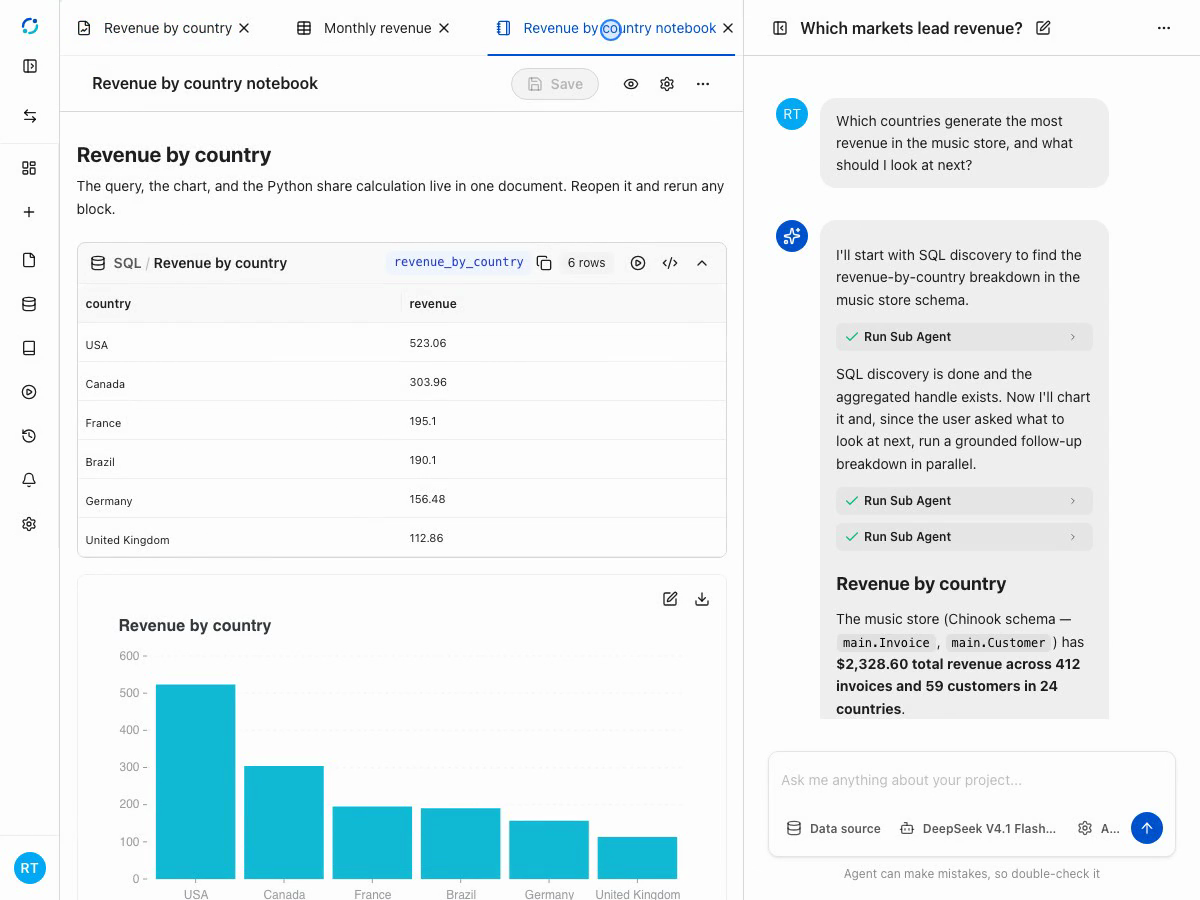
One workspace from question to reproducible answer.
Agents plan the work, query your sources, and leave behind SQL, charts, notebooks, and Python you can inspect and rerun.
Agent chat
A coordinator delegates to SQL, chart, notebook, and Python specialists, with every tool call visible.
Reproducible notebooks
Mix prose, SQL, Python, charts, tables, and diagrams in one document that saves its results.
SQL and your sources
Query the managed local lakehouse plus DuckDB, SQLite, PostgreSQL, and MySQL connections.
Charts
Turn a result into a saved chart with its data, configuration, and editor kept together.
Python and data frames
Run Python blocks that load SQL results by alias, without re-querying the source.
Local-first and your models
Run the app, API, worker, and kernels on your machine; bring Ollama, LM Studio, or a cloud provider.
Quick start
Run it on your machine in two commands.
Install from PyPI, start the local server, and open the workspace. Your files, project database, and kernels stay on your machine.
Read the install guide$ uv tool install kontext-studio
$ kontext serve